

Why Businesses Love Hexnode MDM?
.png)
Endpoint Management
.png)
Easy on the Budget
.png)
Zero-Touch Deployment
.png)
Enterprise-ready Integration
.png)
Intelligent Automation

Hexnode is listed as a leader and a major player in IDC MarketScape UEM Vendors Assessment Reports 2025/26
.png)
Hexnode Recognized in the 2026 Gartner® Magic Quadrant™ for Endpoint Management Tools
.png)
Forrester includes Hexnode as a Notable vendor in The Unified Endpoint Management Landscape, Q3 20235
Multi-OS Device Management
Not every MDM solution is built to support diverse enterprise environments.
But Hexnode MDM solution delivers consistent security, policy enforcement, and seamless device management across multiple operating systems

Windows

Linux

Android

Chrome OS

macOS

TV OS

iOS

IoT
Mobile Device Management
Features & Capabilities
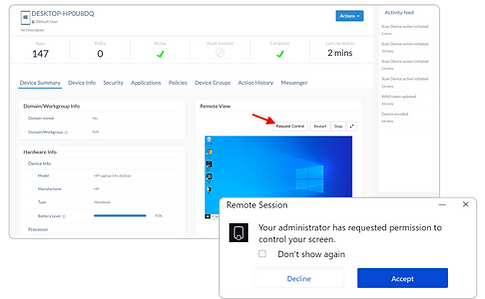
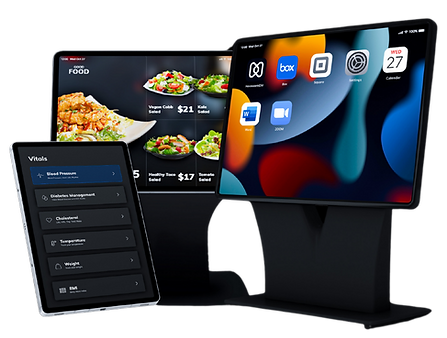
Everything you need to securely manage, monitor, and control your organization's devices from one platform.
.png)
.jpg)
Geofencing
Ensure location services stay active on all enterprise devices for accurate and continuous tracking.
Real-Time Location Tracking
Add location based security measures with geofencing. It ensures sensitive data does not leave your corporate network
Enforced Location Settings
View and track device locations. Log and export location history of devices.
.png)
Enrolling Device to MDM/UEM
Simplify device onboarding with secure, automated enrollment that saves IT time and ensures policy compliance.

Zero-Touch Enrollment

Google Workspace Enrollment

QR Code & URL Enrollment

Samsung Knox Enrollment

IMEI & Serial Number Enrollment

Apple User Enrollment

Email-Based BYOD Enrollment

Windows Autopilot
Hexnode
Subscription Plan
✔ Start with 15 devices ✔ Per device pricing ✔ Fully functional trial
Mobile Device Management
System Requirements
Device | Suggestion | Minimum |
|---|---|---|
iOS | iOS 13.0 and above | iOS 11.0 and above |
iPadOS | iPadOS 13.0 and above | iOS 11.0 and above |
macOS | macOS 10.15 and above | macOS 10.7 and above |
tvOS | tvOS 13.0 and above | tvOS 6.0 and above |
visionOS | visionOS 1.1 and above | visionOS 1.1 and above |
Storage Requirements
Feature | iOS | macOS | Android | Windows | Linux | visionOS |
|---|---|---|---|---|---|---|
Hexnode For Work App | — | — | 20 MB | — | — | — |
Hexnode Email App | 48.1 MB | 63.4 MB | — | — | — | — |
Hexnode Kiosk Browser App | — | — | 59 MB | — | — | — |
Hexnode Remote Assist App | — | 371.9 MB | 6 MB | 4 KB | — | — |
Hexnode UEM App | 45 MB | 243.4 MB | 20 MB | 4 KB | 28.2 MB (Hexnode agent file) | 45 MB |
Supported Browsers
We recommended that you access the Hexnode UEM portal using the latest versions of the following browsers:
-
Google Chrome 20 and above versions.
-
Apple Safari 5 and above versions.
-
Microsoft Edge.
-
Mozilla Firefox 4 and above versions.
-
Microsoft Internet Explorer 7 and above
Mobile Device Management
FAQ
How does the Hexnode UEM license work?
Hexnode MDM pricing is based on the number of devices. You pay only for the devices you manage with Hexnode.
Will my data be retained if I subscribe to any of the paid plans?
Yes, of course. All your registered users, devices and data will be retained if you purchase a subscription before your trial expires.
How can I renew my monthly subscription?
Your monthly subscription is set to renew automatically. We will notify you before renewing your subscription.
Can I cancel my subscription anytime?
Yes. You can cancel your subscription anytime by clicking on the cancel button on the billing page.
Can I try Hexnode UEM for free?
Yes, you can try Hexnode UEM free of cost for 14 days. We do not require your credit cards at all for the Trial.
What is the minimum number of licenses that I need to purchase?
The minimum number of licenses that need to be purchased is 15 for the cloud version of the plans.
Can I recover any data after cancellation?
No. We will delete all your data after cancellation. However, we will consult with you before deleting your data.
How can I request a quote?
Please let us know your email in the form above and we'll send you a quote right away.
Mobile Device Management
Customer Case Study

_5_11zon.jpg)

From Loss to Control:
Remote Device Tracking & Management
Problems
-
A tour and travel company serving guests, provided Android hotspot devices with their built-in tour guide app. But without proper control, guests could misuse the devices.
-
They needed a way to lock devices to the tour guide app, send notifications, and track locations to avoid loss or misuse.
Solutions
-
Using MDM, PT HIS Bali set the devices in Kiosk Mode, restricted access by disabling factory reset and Google Play Store, and ensured the hotspot feature was always available for travelers.
-
The IT team could manage apps remotely, send notifications directly to devices, and use location tracking to monitor or recover devices — ensuring a secure and smooth guest experience.
.jpg)